Technical analysis of the campaign
What we have established from message evidence and a victim-side incident, what we infer, and what we still need. Written for the IT providers and security people who look after dental practices. The plain-language advisory is at the main page; this page assumes technical background. Corrections and additional intelligence are welcome via the form below.
1Attack chain
The propagation model is what makes this campaign effective in a niche sector: every message arrives from a genuine, previously-corresponding address, so SPF, DKIM and DMARC all pass and reputation-based filtering is useless. Targeting requires no attacker knowledge of the industry — the compromised mailbox's own contact graph is the targeting.
2Message evidence
We hold original .eml files from five waves of the file-share campaign (13, 14, 16, 23 and 28 July 2026, AEST) and two copies of the PRODA campaign (7 August 2026). Key observations from headers and bodies:
Authentication and origin
- All observed file-share messages pass SPF, DKIM and DMARC at the receiving MTA. DKIM alignment varies by host (one business sample signs under an onmicrosoft.com domain, another under gappssmtp.com), and every observed sending domain publishes p=none. The 23 July sample sent from a compromised consumer Gmail account carries a valid d=gmail.com DKIM signature and a Message-ID of the form <…@mail.gmail.com> — i.e. sent through a genuine authenticated Gmail session, not spoofed and not via third-party SMTP. This is account takeover, not header forgery.
- Compromised senders include both consumer Gmail addresses and custom-domain business mailboxes; the business-domain sample also transited Google infrastructure (Workspace-hosted).
- Recipients are usually concealed: To: undisclosed-recipients:; with the actual recipient in Bcc. One sample carried no To: header at all.
- Send times across the five held samples: 03:41, 06:32, 08:18, 10:12 and 10:58 AEST — two outside business hours, three within. Earlier drafts of this advisory described the campaign as clustering in the early morning; the held evidence does not support that, and time of day should not be relied on as a triage signal.
Lure construction
- HTML body imitates a Microsoft OneDrive/SharePoint share card: share icon, "[Practice] shared a file with you" heading, a named ".DOCX" file row, an "Open Document" button, Microsoft logo (embedded inline as base64 cid: images) and a "Privacy Statement" link.
- The .docx file-type icon in one sample is hot-linked from Wikimedia Commons — observed once so far, worth watching as a possible kit fingerprint.
- The instruction "For security reasons, please view this document using your Desktop or Windows Laptop" appears consistently — the payload is Windows-only and the operators are filtering out mobile clicks.
- One sample uses two distinct fresh domains in a single message (payload link vs. decoy "privacy statement" link), suggesting templated kit generation rather than hand-built mails.
- The compromised account's genuine signature block (address, phone) is retained beneath the lure — the operators send from the real mailbox UI or preserve its formatting deliberately.
3Infrastructure
| DOMAIN (defanged) | PATH | FIRST SEEN | SENDER TYPE |
|---|---|---|---|
| avernix[.]vu | /access/ | 14 Jul 2026 | consumer Gmail |
| uvanv[.]vu | — | early wave | reported to us; sample not held |
| xornavo[.]vu | /file/ | 13 Jul 2026 | business mailbox (custom domain) |
| lornica[.]vu | /dental | 16 Jul 2026 | business mailbox (custom domain) |
| clientesetupdoc[.]vu | /access | 23 Jul 2026 | consumer Gmail (decoy link in same mail) |
| docsecdental[.]vu | /mesh | 23 Jul 2026 | consumer Gmail (payload link) |
| dytrix[.]vu | — | 24 Jul 2026 | business mailbox (custom domain); detected by extension telemetry, sample not held |
| bzlvaka[.]vu | /access/ | 28 Jul 2026 | consumer Gmail; lure reworded to "Invitation to view shared folders", inline image content-IDs reused from an earlier sample |
| dprvirz[.]vu | — (also doc.dprvirz[.]vu) | 31 Jul 2026 | consumer Gmail; detected by extension telemetry, sample not held |
- TLD choice: all observed domains use .vu (Vanuatu ccTLD). WHOIS/passive-DNS visibility for .vu is poor, which may be part of the appeal alongside cheap registration. Domain names are pronounceable invented words or vaguely thematic compounds ("docsecdental", "clientesetupdoc"); one fresh registration per wave, discarded after.
- Cloaking: a urlscan.io submission of one live link returned a Wikipedia article as the rendered page — the kit fingerprints scanners/sandboxes and serves a decoy. Treat any "clean" verdict from automated URL scanning as meaningless for this infrastructure. We do not yet know the fingerprinting method (IP reputation, headless detection, UA, or one-time-token links).
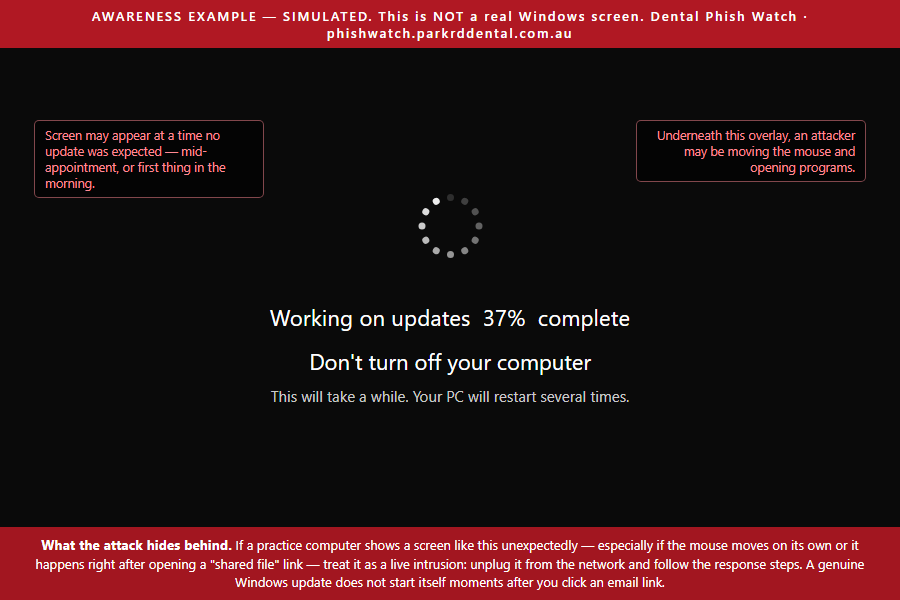
- Payload: identified 17 Aug 2026 — see section 3c. The one confirmed-infected machine displayed a full-screen fake Windows Update during installation and later showed live cursor control; it was reimaged before forensic capture (lesson learned — see section 5's asks). RAT family, persistence mechanism, and C2 are therefore unknown to us.
3bRelated campaign — PRODA/HPOS credential phishing
A distinct but sector-adjacent campaign observed 7 Aug 2026, worth cataloguing here because it targets the same victims and our tooling now detects it. Two messages arrived twelve minutes apart at a targeted Australian dental practice (name withheld), which received them cold and forwarded them to us for analysis. The forwards are ordinary authenticated sends from that practice's own mailbox; nothing indicates the reporting practice was compromised, and unlike the .vu campaign these lures were delivered directly from attacker-controlled domains rather than from a hijacked trusted sender.
| ELEMENT | OBSERVED |
|---|---|
| Impersonated brand | Services Australia — "Provider Digital Access (PRODA)" / "HPOS" |
| From (display name "PRODA") | info@ghaspert[.]com · support@machsselbst[.]com |
| Payload URL (both waves) | https://verifications[.]es/verification/v333/v3 |
| Shared sending platform | both messages carry <mid-{32 hex}@akoneseo.com> in References/In-Reply-To despite different From domains — one platform behind both waves, and a useful pivot |
| Objective | PRODA credential harvest (→ Medicare/HPOS/DVA/AIR access), not malware |
| Evidentiary basis | Two forwarded copies. No original Received chain, Return-Path or Authentication-Results is held for the ghaspert.com / machsselbst.com messages, so no authentication claim is made about them — the sender addresses and 08:43/08:55 timings are taken from the forwarded body. |
- Display-text deception: the anchor text servicesaustralia.gov.au/proda is hyperlinked to verifications[.]es — a classic mismatch between visible text and href. Our detector now scores anchor-text/href registrable-domain mismatch independently of any lure wording.
- Government-impersonation heuristic: PRODA/HPOS/myGov/Medicare account-action wording combined with a non-.gov.au action link. Legitimate Services Australia links terminate at .gov.au; there are no exceptions to weigh.
- Distinct infrastructure from the .vu folder-share campaign (different TLD, sender pattern, and objective); whether the two share an operator is unknown. Reported alongside it because the target sector and the "urgent account action" social engineering overlap. The delivery models differ: the .vu campaign propagates from compromised trusted senders, while the PRODA lure is cold-delivered direct from throwaway attacker domains.
3cPayload identified — ScreenConnect double implant
Updated 17 Aug 2026. An Australian IT provider supplied Windows System event logs (Event ID 7045) from a dental practice compromised on 14 August after a staff member opened a campaign-A link, and offered further assistance unprompted. This resolves the largest open question in earlier versions of this advisory. Credit by name is pending their agreement — see acknowledgements.
The payload is not bespoke malware. It is ScreenConnect (ConnectWise Control) — the genuine, code-signed commercial remote-support product — installed as an unattended e=Access agent running as a LocalSystem auto-start service. That configuration gives the operator hands-on-keyboard control of the machine on every boot, with nobody at the keyboard needing to approve anything. It also explains why antivirus does not object: the binary is legitimately signed by ConnectWise and is identical to what every honest deployment of the product looks like.
Two implants, not one — the operationally critical detail
Two agents were installed 70 seconds apart, pointing at two different servers:
| # | INSTALLED | RELAY HOST | PORT | SERVER TYPE |
|---|---|---|---|---|
| 1 | 14/08/2026 09:42:25 | instance-eyig0h-relay.screenconnect[.]com | 443 | ConnectWise-hosted cloud instance |
| 2 | 14/08/2026 09:43:35 | relay.cojeqinvpt[.]online | 8041 | attacker self-hosted relay |
The 16-hex string in each service name is the thumbprint of the controlling server’s public key. The two thumbprints differ, which proves cryptographically that these are two distinct servers with two distinct key pairs — not one server reachable by two names, and not a reinstall.
The fake “Windows Update” screen is ScreenConnect itself
The full-screen update overlay reported by victims is not a separate loader. It is ScreenConnect’s own configurable branding, abused via a Client.Override.resources file to replace the application title and background — the technique G DATA documented as EvilConwi in June 2025. The mouse moving afterwards is simply the operator working behind it. Stop looking for a third-party overlay program.
Indicators
| TYPE | INDICATOR |
|---|---|
| Network | relay.cojeqinvpt[.]online — TCP 8041 (attacker relay) |
| Network | cojeqinvpt[.]online — apex, registered 13 Oct 2025 via NameCheap |
| Network | instance-eyig0h-relay.screenconnect[.]com — TCP 443 |
| Network | Outbound TCP/8041 to any host outside screenconnect.com — highest-value single firewall rule |
| Host | ScreenConnect Client (370db60ef59c8cab) ScreenConnect Client (19e702d7c59aaac2) |
| Host | C:\Program Files (x86)\ScreenConnect Client (<thumbprint>)\ HKLM\SYSTEM\CurrentControlSet\Services\ScreenConnect Client (<thumbprint>) |
| Session GUIDs | bf14ac3f-c8f9-4b08-b916-85457a25cbb3 · b1fd6401-d0c4-45c9-b165-572ce2ee0f4e |
| Config | In either install directory: ShowSystemTrayIcon=false, ShowBalloonOnConnect=false, HideWallpaperOnConnect, or a Client.Override.resources file — the EvilConwi fingerprint |
Deliberately not listed as indicators: the binary name, path, hash or code signature. ScreenConnect.ClientService.exe signed by ConnectWise under Program Files is exactly what a legitimate install looks like, and treating it as an indicator produces false accusations against honest IT providers.
Detection and response
A read-only PowerShell checker covering all of the above — service-install events, live services, the relay host each client dials, install folders and connection evidence — is published at Check-ScreenConnect.ps1, and as a self-elevating one-click wrapper for practice staff at Check-This-PC.bat (same checks, embedded; plain text, no executable). Removal for technicians is Remove-ScreenConnect.ps1 — report-only by default, preserves event logs, service configuration and operator-transferred files before it touches anything, supports a -KeepRelay exclusion for the provider’s own agent, and checks the LSA Authentication Packages entry that can survive an uninstall. Note that removal is remediation of the access path only: a host that ran an unattended LocalSystem agent warrants a rebuild and full credential rotation. It changes nothing and removes nothing. Plain-language instructions for practice staff are in section 6 of the advisory.
Reporting routes verified 17 Aug 2026: ConnectWise abuse at screenconnect.com/report-abuse and securityincident@connectwise.com (supply the instance name, relay host, thumbprint and session GUID); the self-hosted relay’s host at abuse-team@tier.net; the registrar at abuse@namecheap.com under “Hacking Activity”; and the indicators to ThreatFox so other practices’ firewalls pick them up. Australian incidents to ReportCyber, lodged as a business.
4Detection
Because domains rotate per wave, our open-source detector (browser extension, GitHub) scores message content rather than matching indicators alone. Signals, roughly in order of evasion-resistance:
- Share-lure phrasing with a link whose registrable domain is not a recognised file-sharing host (works on any TLD);
- The desktop/Windows-laptop instruction (operationally necessary to them — dropping it costs them victims);
- Brand mismatch: Microsoft/OneDrive branding with non-Microsoft link targets;
- High-risk TLD plus short generic path;
- Known-domain blocklist (zero-FP repeat detection only).
Server-side, the highest-leverage controls are a transport rule quarantining .vu/ links (we know of no legitimate .vu correspondence in Australian dentistry), an external-sender share-lure disclaimer rule, and resolver-level blocking of the .vu zone at practice routers. Copy-paste configurations for Microsoft 365 and Google Workspace are in the IT configuration guide.
5Open questions — what we need from you
- Initial access method. Unconfirmed whether mailbox credentials come from the RAT (browser credential theft on infected machines), from a credential-phishing stage on the same links, or elsewhere. If you've responded to one of these and know, we want to hear it.
- Payload — ANSWERED 17 Aug 2026 (see section 3c). Identified as a ScreenConnect double implant from event logs supplied by an IT provider. Still wanted: a disk image or EDR telemetry from an infected host, the contents of a Client.Override.resources file, and connection timelines showing how long operators remained.
- Cloaking mechanism. Anyone able to capture the real payload flow (residential IP, real browser) alongside the decoy response could characterise the gate.
- Scale. Our numbers are only what's reported to us. Mail-flow logs showing outbound bursts from a compromised practice would size a wave properly.
- Earlier activity. Whether this crew targeted other Australian healthcare verticals before dentistry.
Original .eml samples (with headers) are available to legitimate researchers and responders on request via the form below. Please also report independently to the ACSC — our evidence is already lodged.
6Contact, ideas and intelligence
Ideas for the tooling, corrections to this analysis, intelligence to share, or anything else — this opens a pre-filled email in your own mail client, so you can attach files (.eml samples, hashes, logs) before sending. Reports of sightings should use the main reporting form instead.