–
practices with compromised accounts identified
When someone opens one of these links, what gets installed is ScreenConnect — genuine remote-support software, turned against the practice, which hands a stranger full control of the PC every time it starts. Because it is legitimate signed software, antivirus does not flag it. This checker looks for it specifically, and tells you which server it reports to.
Read-only — it changes nothing, installs nothing and removes nothing. It is plain text, not a program: right-click and open it in Notepad to read every line first. We deliberately do not offer a .exe, because downloading and running programs from websites is the habit this campaign relies on.
| Status | ACTIVE |
|---|---|
| First observed | Mid-2026. Most recent file-share wave 28 July 2026; PRODA/HPOS credential campaign first seen 7 August 2026. Payload identified 17 August 2026 from a 14 August compromise |
| Sector affected | Dental practices, Australia-wide (compromised senders identified to date in Victoria and New South Wales) |
| Threat type | Two campaigns: (a) business email compromise → file-share lure → remote-access trojan (Windows); (b) Services Australia impersonation → PRODA/HPOS credential theft |
| Last updated | 28 August 2026 — payload identified, self-check published |
| Issued by | A Victorian dental practice affected by this campaign, in coordination with reports from peer clinics. Contact via the reporting form (section 9). |
| Source code | All tooling and this site are open source for independent review: github.com/DentaSuite/dental-phish-guard |
Answer below and you'll get a plain-English checklist for your exact situation — whether you own a practice or work across several, and whether anything has been clicked. Nothing you answer is recorded. (Prefer a full page? Open it separately.)
Two distinct phishing campaigns are currently targeting Australian dental practices. They are described separately throughout this advisory because they behave differently and require different responses. Section 2 sets them side by side so you can identify which one you are holding.
Campaign A propagates between practices through compromised email accounts. After gaining access to a clinic's mailbox, the operator sends "shared a file with you" emails to that clinic's correspondents. Because the messages originate from a genuine, previously trusted account, they pass SPF, DKIM and DMARC authentication and are rarely intercepted by spam filtering.
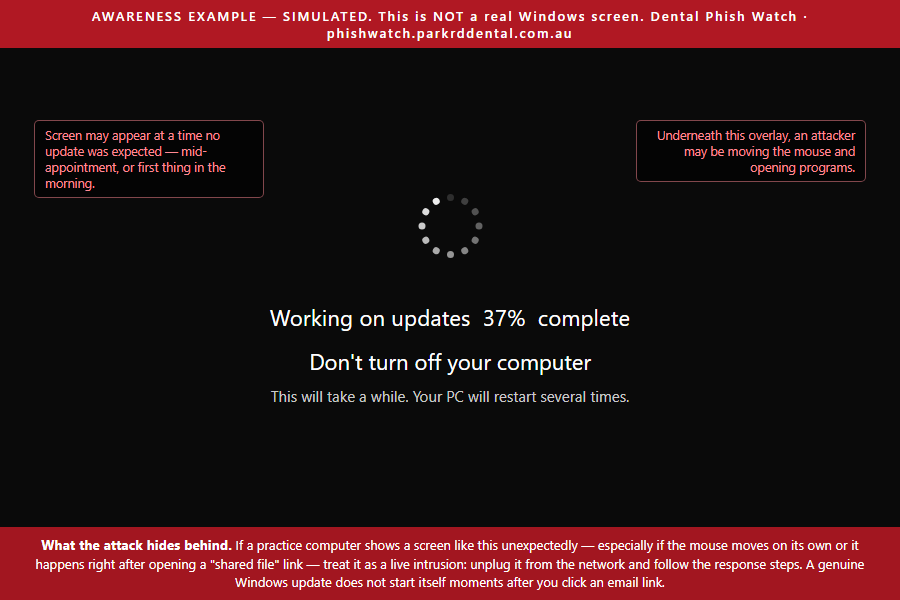
The linked pages deliver a remote-access trojan for Windows. During installation the malware displays a fake Windows Update screen; an infected machine observed by the issuing practice showed live hands-on-keyboard control by a remote operator. Follow-on activity has included repeat access attempts weeks after initial compromise.
Each recipient practice that is compromised becomes a new distribution point to its own contact network. Compromised senders have been identified in both Victoria (a south-east Melbourne cluster consistent with propagation through local referral relationships) and New South Wales, indicating national reach: any practice that has ever corresponded with an affected clinic may be targeted regardless of state.
Link-scanning services return benign results for campaign A infrastructure: the kit serves a decoy page to automated scanners. A "clean" URL scan is not evidence of safety.
Campaign B, first seen on 7 August 2026, is a different proposition. It impersonates Services Australia, claims the recipient's PRODA account must be re-linked to HPOS, and harvests the credentials entered on a counterfeit sign-in page. It installs nothing, and it does not arrive from a hijacked colleague — it is delivered cold from throwaway attacker domains. A stolen PRODA credential exposes HPOS, and through it Medicare claiming, DVA, the Australian Immunisation Register and patient records.
These are different attacks with different aims and, importantly, different responses. Getting the wrong one costs you: wiping a computer does nothing about a stolen PRODA login, and changing a password does nothing about a machine with an intruder on it. Work out which one you have before acting.
Fake file-share notice that installs malware
Fake Services Australia notice that steals your login
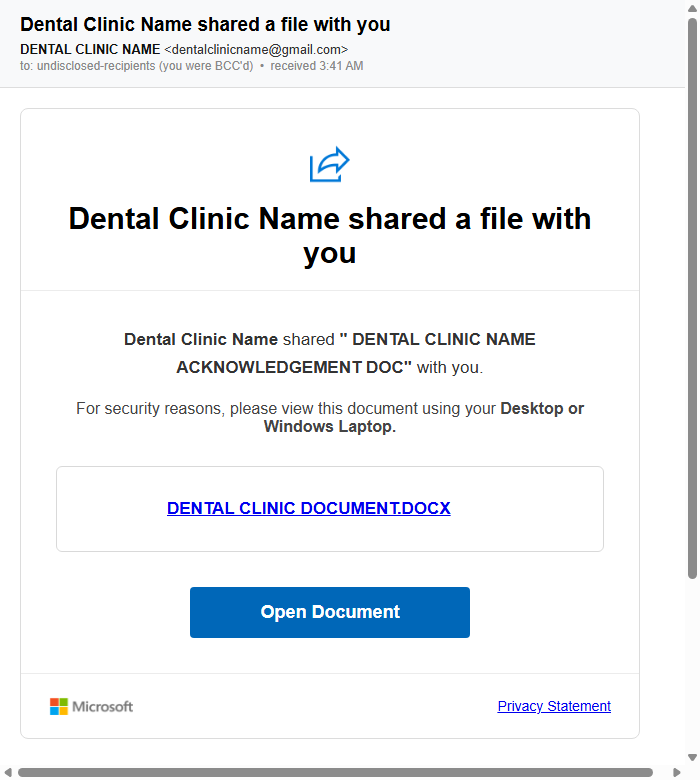
Fig. 2 — Campaign A email received 23 July 2026 (sending practice anonymised). Waves are near-identical: imitation Microsoft share card, “Open Document” button, instruction to open on a desktop computer.
| DOMAIN (do not visit) | OBSERVED |
|---|---|
| avernix.vu/access | 14 Jul 2026 |
| uvanv.vu | early wave |
| xornavo.vu/file | 13 Jul 2026 |
| lornica.vu/dental | 16 Jul 2026 |
| clientesetupdoc.vu/access | 23 Jul 2026 |
| docsecdental.vu/mesh | 23 Jul 2026 |
| dytrix.vu | 24 Jul 2026 |
| bzlvaka.vu/access | 28 Jul 2026 |
| dprvirz.vu (also doc.dprvirz.vu) | 31 Jul 2026 |
A newly registered domain is used for each wave. Detection should rely on the message pattern, not on any specific domain.
First seen 7 August 2026. The email claims your Provider Digital Access (PRODA) account is no longer linked to Health Professional Online Services (HPOS) and must be reconnected, with a “Reconnect PRODA” button. It is formatted as a routine automated notice from Services Australia.
| INDICATOR (do not visit) | ROLE | OBSERVED |
|---|---|---|
| verifications.es/verification/v333/v3 | credential-harvest page | 7 Aug 2026 |
| ghaspert.com | sender domain | 7 Aug 2026 |
| machsselbst.com | sender domain | 7 Aug 2026 |
Figures are compiled from sighting reports and automated detections submitted by participating practices, and update as reports are received. Affected practices are treated as victims: they are notified privately by telephone and are not named. Map positions are rounded to approximately 10 km.
There are two distinct questions: whether a practice computer is infected, and whether the practice mailbox is compromised and being used to attack others. Either can be true without the other, and a compromised mailbox usually produces no symptoms visible to its owner — most affected practices learn of it only when a colleague telephones to ask about a strange email.
Updated 17 August 2026. We now know exactly what campaign A installs, from event logs supplied by an IT provider after a practice was compromised on 14 August. It is ScreenConnect (also sold as ConnectWise Control) — a genuine, commercially sold remote-support product, not a virus. That matters for two reasons: antivirus will not flag it, because it is legitimate signed software; and it is installed as a background service that starts with the computer, so the operator regains control every time the machine boots.
In the case we have logs for, two copies were installed 70 seconds apart, connecting to two different servers. Removing one leaves the other. Anyone cleaning up must find and remove every one.
It tells you one of three things: nothing found; software found — check with your IT provider, listing the exact server address it connects to; or matches a known attack server, with what to do immediately.
It only reads. It changes nothing, installs nothing and removes nothing. Repeat on every computer in the practice — a result on one PC says nothing about the others. IT providers who would rather run the PowerShell directly can use Check-ScreenConnect.ps1, or push the checks from their RMM.
Do not delete it yourself, and do not let anyone delete it as the first move. That instinct is understandable but it makes things worse in three ways: it destroys the records your insurer and a data-breach assessment depend on; if the operator is connected at the time they see it happening and can react; and removing the software does not make the computer safe, because whoever had control may have added accounts, stolen saved passwords or left other tools behind. Deleting closes the door while leaving everything they did inside.
Check every other computer in the practice before assuming it was only one.
For IT providers: Remove-ScreenConnect.ps1 reports by default and changes nothing until run with -Execute and a typed confirmation. It exports the event logs, service configuration and any files the operator transferred before removing anything, takes a -KeepRelay exclusion so your own legitimate agent is left alone, checks the LSA persistence entry that can survive an uninstall, and re-verifies afterwards.
Two indicators worth giving your IT provider: the attacker relay in this case was relay.cojeqinvpt.online on port 8041, and the second implant used a ConnectWise-hosted address. Blocking outbound port 8041 to anything outside screenconnect.com is the single most useful firewall rule. Full detail is on the technical page.
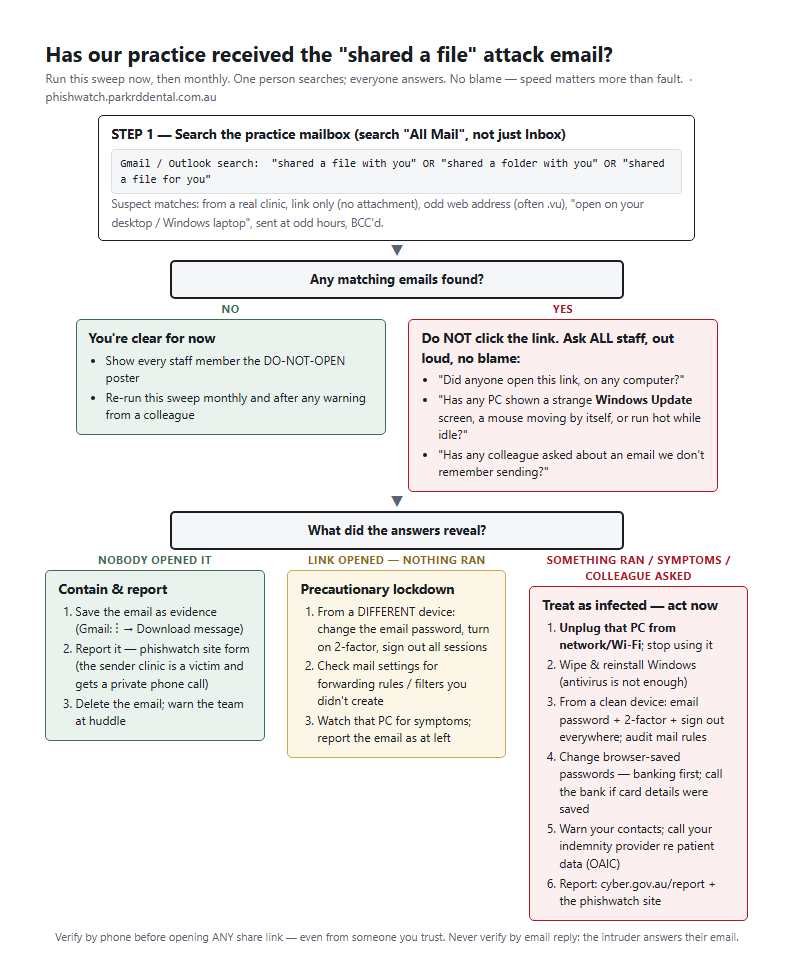
Have one person search the practice mailbox — including archived mail, not just the inbox — with:
"shared a file with you" OR "shared a folder with you" OR "invitation to view shared"
Then run a second search for the government-impersonation campaign — the first search will not find it:
"PRODA" OR "HPOS" OR "Provider Digital Access"
Treat a match from the second search as suspect if it carries Services Australia branding and a sign-in button that is not a .gov.au address.
The same phrase searches work in Gmail and Outlook. Suspect matches from the first search carry the indicators in section 2: real clinic as sender, single link with no attachment, unusual domain, an instruction to open on a desktop computer, odd send times. Then ask every staff member, openly and without blame, whether anyone opened such a link and whether any machine has shown the symptoms above. The flowchart below walks a practice through the outcomes; a printable copy is in section 6.
myaccount.google.com/security (devices, recent activity, third-party access); in Gmail settings review Forwarding and POP/IMAP and Filters and blocked addresses; click Details at the bottom-right of the inbox for recent session activity.account.microsoft.com (or Entra sign-in logs, if administered); in Outlook settings review Mail → Rules and Forwarding; administrators can run a message trace for unexpected outbound volume.If any indicator above is present, proceed to section 8 (incident response) and report via section 7. If in doubt, treat the mailbox as compromised — a password change with multi-factor enrolment costs minutes; a missed compromise costs weeks.
.vu. Configurations for Microsoft 365 and Google Workspace are provided in the IT configuration guide.9.9.9.9) so known-malicious domains fail to resolve on all devices.Download the extension zip above, right-click it and choose Extract All (remember where the folder goes — usually Downloads), then:
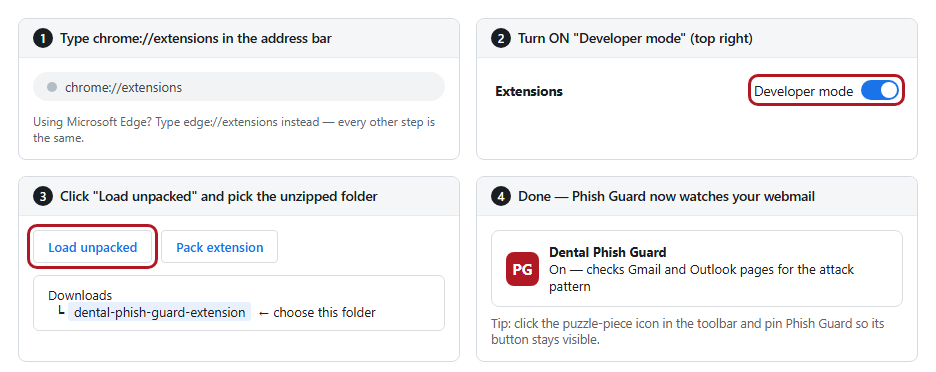
Nothing, most of the time — it sits quietly. But when an email matching this attack is opened in Gmail or Outlook web, a red warning appears above the message before anyone can click, spelling out exactly why it's dangerous:
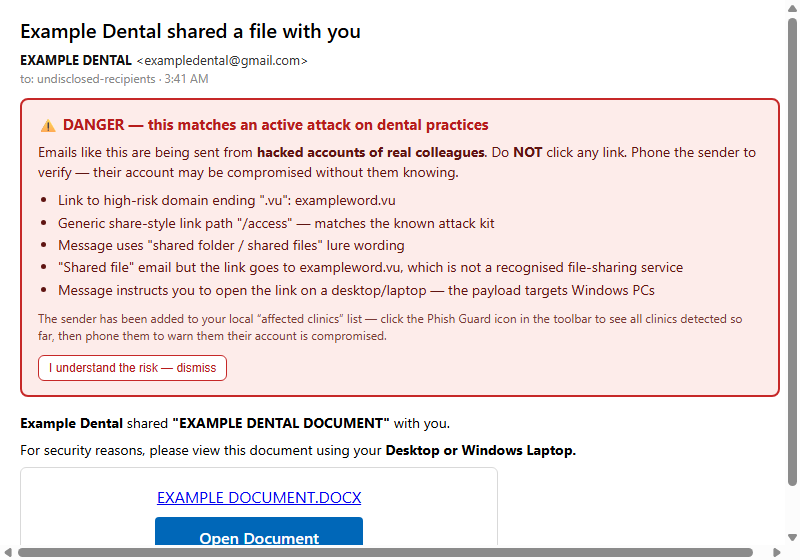
Print the poster and the sweep flowchart on A4 and put them where email is actually read — the front desk and the staff room, not the filing cabinet. Open the booklet in Word, type your practice name on the cover, print a copy per staff member, and walk through it at a team meeting — it takes about 15 minutes and reception staff are the most important audience. The IT guide isn't for you: forward it to whoever looks after your computers with the message "please do these and confirm in writing".
Everything above, including this site itself, is published in full at github.com/DentaSuite/dental-phish-guard so you or your IT provider can verify exactly what it does before installing. Detection reports are write-only; submitted data is readable only by the advisory coordinator.
Reports serve two purposes: the practice whose account was compromised is notified privately by telephone, and new infrastructure is added to the indicator list, the browser extension, and takedown requests. Reports are reviewed individually; nothing is published automatically and reporting practices are not named.
The most useful evidence is the original message file. In Gmail: message menu (⋮) → "Download message". Attach it to the pre-filled email this form produces. Do not include patient information.
Use this when someone opened a file-share link and something ran. If instead someone typed credentials into a fake PRODA page, this is the wrong list — go to section 11.
Use this when someone typed a PRODA username, password or verification code into a page reached from an email. The computer does not need wiping — this campaign installs nothing. The exposure is the account and everything HPOS reaches through it.
This advisory exists because people who had no obligation to help chose to. Nearly everything on this page beyond our own practice’s experience came from someone forwarding an email, sending a log file, or picking up the phone.
| WHAT | CONTRIBUTED BY | WHEN |
|---|---|---|
| Identification of the campaign-A payload. Windows service-install logs from a practice compromised on 14 August, which established that the payload is ScreenConnect deployed as a double implant — the finding behind section 6, technical section 3c and the checker script. This had been the single largest gap in the advisory. | An Australian IT provider, on behalf of a client practice credit by name pending their agreement |
17 Aug 2026 |
| Campaign B samples. Two copies of the fake Services Australia / PRODA email, forwarded intact with headers — the basis of section 4. | A colleague at a targeted practice | 7 Aug 2026 |
| Campaign A samples and sightings from practices in Victoria and New South Wales, which established the wave timeline and the domain rotation. | Reporting practices (not named — see policy above) | Jul – Aug 2026 |
The open questions are listed at the end of the technical analysis. The most useful things anyone can send are an original phishing email with its headers intact, firewall or DNS logs showing how long an operator remained connected, or a disk image taken before a compromised machine is rebuilt. Sightings go through section 9; technical material through the contact form.
Compiled and maintained by Dr James Lee, Park Road Dental.